
If you’re considering affiliate marketing, ClickBank offers a way to promote existing products without creating your own. But is it legitimate, what does it cost, and how difficult is it to get paid? This ClickBank review examines those questions from a beginner’s perspective.
After looking through ClickBank’s homepage and main navigation, my first impression was positive: the website looks professional and trustworthy to me. That impression alone doesn’t establish product quality, payout reliability or earning potential.
How I researched this review: I build my own websites with Wealthy Affiliate and share what I’m learning about niche research, WordPress, content creation and affiliate marketing on Thrive With Angel. I haven’t created a ClickBank account, promoted its products, received a payout or taken Spark courses. For this review, I examined the public website and used AI-assisted research to compare official documentation, policies and third-party feedback. I assessed costs, payout conditions, product-selection risks and suitability for beginners. The research was checked on November 25, 2026; this is not a hands-on affiliate performance review.
Affiliate disclosure: I use Wealthy Affiliate to build my own online business. If you join through my referral link, I may earn a commission at no additional cost to you. This gives me a financial incentive to recommend Wealthy Affiliate, which is why I want to be transparent about that relationship. This article contains no ClickBank affiliate links. You can read my full affiliate disclosure for more information.
My quick verdict on ClickBank
ClickBank is a legitimate, established affiliate marketplace that can be worth exploring if you’re interested in promoting other people’s products online.
Its main advantages are free registration, access to a variety of affiliate offers, flexible commission arrangements and an established system for tracking sales and processing payments.
Its biggest limitations are the need to carefully evaluate individual products, the financial requirements that must be satisfied before receiving payments, and the challenge of attracting an audience that is genuinely interested in what you’re promoting.
Here’s what you should know at a glance.
Feature | ClickBank |
|---|---|
Type of platform | Affiliate marketplace and e-commerce platform |
Established | 1998 |
Affiliate registration | Free |
Standard monthly platform fee | None |
Products available | Digital and physical products |
Commission arrangements | Revenue share and cost per action (CPA) |
Default payment threshold | $100 |
Minimum selectable payment threshold | $50 under the current accounting policy |
Standard payment-processing fee | $5 per issued payment |
Training | Free resources and optional paid Spark education |
Main advantages | Product availability, low entry cost and established infrastructure |
Main disadvantages | Product quality concerns, payment conditions and the need to generate your own traffic |
Best suited for | Affiliates with a defined audience and a realistic marketing plan |
Official website |
If you’re a complete beginner, I’d focus on developing those skills before spending significant money on marketing tools, training or advertising.
What is ClickBank?
ClickBank is an e-commerce platform and affiliate marketplace that has been operating since 1998.
It connects three groups of people:
- Sellers: Individuals and businesses that create or supply products and want help reaching customers.
- Affiliates: People who promote those products in exchange for commissions.
- Customers: People who purchase the products.
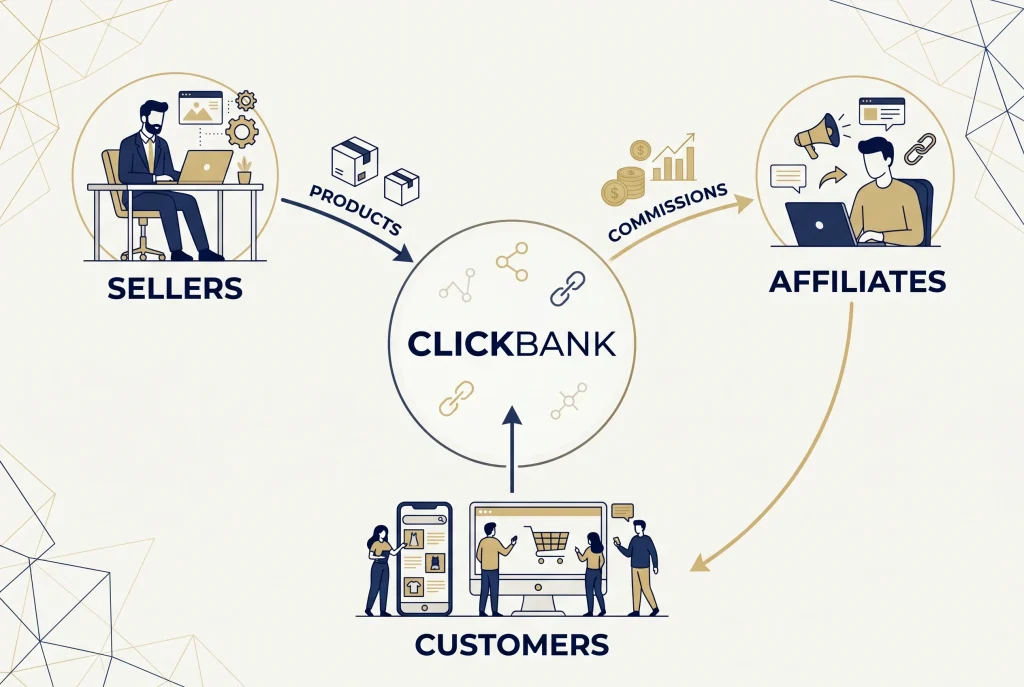
ClickBank acts as an intermediary, providing the infrastructure that connects these groups, tracks eligible referrals, processes transactions and distributes payments.
Products can include educational courses, ebooks, software, subscriptions, supplements and other physical goods.
As an affiliate, you don’t need to develop your own product, manufacture inventory or fulfill customer orders. Instead, your role is to introduce a relevant product to people who might benefit from it.
When someone makes a qualifying purchase through your affiliate tracking link, you can earn a commission.
What ClickBank doesn’t automatically provide is an audience ready to buy from you. Developing that audience remains your responsibility, whether you’re using a website, YouTube channel, social media account, email newsletter or another permitted marketing method.
Is ClickBank legit or a scam?
Based on the available evidence, ClickBank itself is a legitimate commercial platform, not a scam.
Its long operating history, publicly available business information, documented financial policies and established payment infrastructure support that conclusion.
ClickBank also has an accredited business profile with the Better Business Bureau. Accreditation and business ratings are useful pieces of information, although neither guarantees that every customer or affiliate will have a positive experience.
The distinction I consider most important is this: ClickBank’s legitimacy as a platform does not automatically establish the legitimacy, quality or usefulness of every product available through it.
Individual sellers are responsible for their products and many of the claims used to market them.
Some products may provide genuine value. Others may have exaggerated sales pages, questionable claims, confusing subscription arrangements or poor customer experiences.
Before promoting anything, I would separate three questions:
Question | What you need to establish |
|---|---|
Is ClickBank legitimate? | Whether it is a genuine platform with established operations and published policies. |
Is the individual product trustworthy? | Whether the product delivers what it promises and provides reasonable value. |
Is the opportunity profitable for me? | Whether I can attract suitable customers without spending more than I earn. |
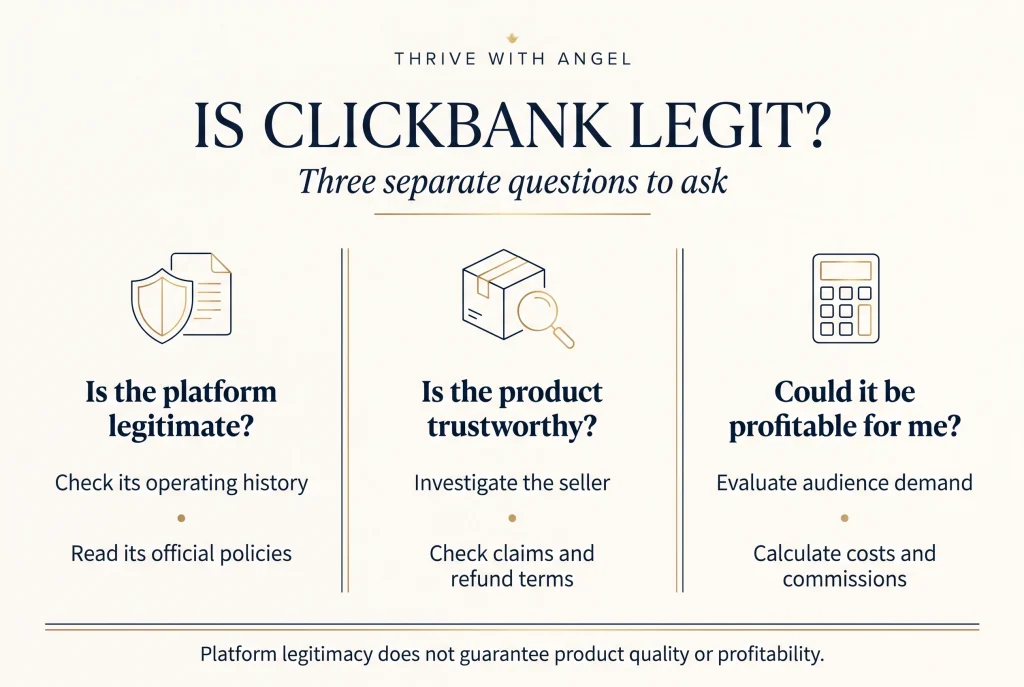
A positive answer to the first question doesn’t automatically mean the other two answers will also be positive.
I wouldn’t dismiss ClickBank because of every negative review about an individual product. Equally, I wouldn’t assume a product is safe to recommend simply because it appears in the ClickBank Marketplace.
How does ClickBank work for affiliates?
ClickBank’s affiliate getting-started guide explains the process of setting up an account, finding products and beginning to promote them.
Here’s what that process looks like in practical terms.
1. Create and configure an affiliate account
You begin by registering for a ClickBank account.
According to ClickBank’s account registration instructions, you need to complete your profile, go through the required verification process, establish an account nickname and configure your payment information.
Your nickname is an identifier associated with your affiliate activity.
You generally don’t need to create a separate nickname account for every seller you promote. Keeping your activity under one appropriate account can also help avoid unnecessarily spreading commissions across separate payment thresholds.
Registration is free, but account eligibility and verification requirements can vary. You’ll need to check whether ClickBank supports your location and which payment options are available to you.
2. Find a relevant product in the Marketplace
The ClickBank Marketplace allows affiliates to discover products in different categories and examine information that can help them evaluate potential offers.
Rather than selecting the product that advertises the highest commission, I would start with one that addresses a genuine problem experienced by the audience I want to serve.
Certain sellers require affiliate approval before their products can be promoted. Finding an offer doesn’t necessarily mean you have immediate permission to promote it.
3. Create your affiliate tracking link
ClickBank uses tracking links known as HopLinks.
A HopLink connects a potential customer to a seller’s landing page while helping ClickBank identify the affiliate responsible for the referral.
ClickBank’s official HopLink guide describes a 60-day referral tracking window. However, attribution still depends on the platform’s tracking rules and technical conditions. Not every purchase made after someone clicks your link is guaranteed to be credited to you.
4. Attract people interested in the product
You can promote suitable products through permitted marketing channels, such as:
- Helpful website articles.
- Educational YouTube videos.
- Relevant social media content.
- Email newsletters sent to consenting subscribers.
- Paid advertising, where the offer and advertising platform allow it.
The important part isn’t simply placing your link somewhere. It’s giving people a genuine reason to consider the product.
For example, someone looking for beginner photography advice would probably find a well-researched review of a relevant photography course more useful than an unrelated affiliate link posted on social media.
5. Earn a qualifying commission
When a purchase is properly attributed to your affiliate activity, ClickBank calculates the applicable commission.
The amount depends on the seller’s commission arrangement, the transaction and other applicable terms.
6. Meet ClickBank’s payment requirements
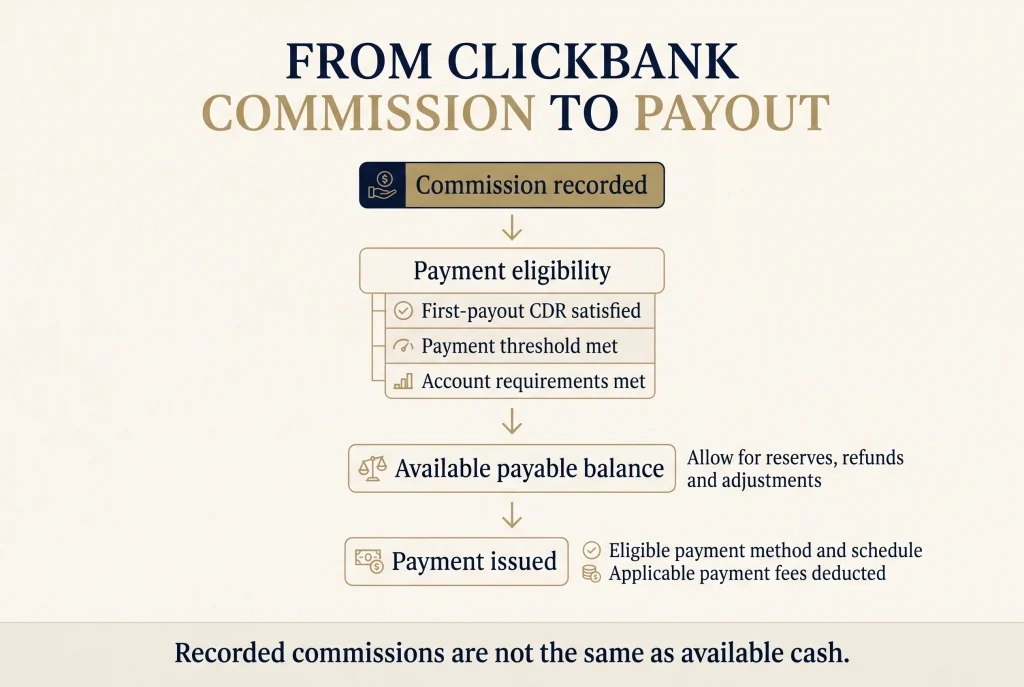
Before receiving your earnings, you’ll need to meet the applicable payment conditions, which can include the Customer Distribution Requirement, a payment threshold, account verification and financial adjustments.
Seeing a commission appear in your account is not the same thing as having money available in your bank account.
How much does ClickBank cost?
ClickBank is free to join as an affiliate, and it does not charge a standard monthly platform membership fee.
However, that doesn’t mean every part of using ClickBank or building an affiliate marketing business is free.
According to ClickBank’s official fee schedule, the following costs may apply.
All amounts below are in US dollars.
Expense | Cost | Who it applies to |
|---|---|---|
Account registration | Free | Affiliates and sellers |
Standard monthly platform fee | None | Affiliates and sellers |
Payment-processing fee | $5 per issued payment | Users receiving payouts |
International wire transfer | Additional $45 where applicable | Users receiving payment by wire |
First seller activation | $49.95 | Sellers after their first product is approved |
Dormant account fees | $1, $5 or $50 per pay period | Qualifying inactive accounts with positive balances |
Spark Monthly | $47/month advertised | Optional education |
Spark Ultimate | $297 one-time advertised | Optional education |
Website, hosting and marketing software | Varies | Depends on your business approach |
Paid advertising | Varies | Optional marketing expense |
Spark prices are based on ClickBank’s published 2026 information and may change. Promotional discounts and package terms can also differ.
Sellers face additional transaction-related costs, but those shouldn’t be confused with the cost of registering as an ordinary affiliate.
The dormant account fees you should understand
ClickBank’s dormant account policy applies to accounts that hold a positive balance but haven’t generated earnings for an extended period.
Time without earnings | Dormant fee per pay period |
|---|---|
After 90 days | $1 |
After 180 days | $5 |
After 365 days | $50 |
The important detail is that these charges apply per pay period, not as a single one-time inactivity charge.
They can also apply when you haven’t yet satisfied the requirements for receiving your first payment.
For example, imagine earning a small commission but never generating enough additional sales to qualify for a payout. If you subsequently stop earning for several months, dormant account fees could gradually reduce that unpaid balance.
An unused account with a zero balance does not meet the published definition of a dormant account subject to these balance-based fees.
ClickBank’s accounting policy also states that it doesn’t notify users when their accounts become dormant. Monitoring your account is your responsibility.
If you eventually decide to close your account, the policy states that a remaining balance below $10 will be forfeited.
What about the cost of building an affiliate business?
Your ClickBank account might be free, but building a way to attract customers could involve expenses.
You might decide to register a domain, purchase website hosting, use email marketing software or invest in educational resources.
My guide to the tools needed to start an online business explains which resources are worth prioritizing and which can wait.
I would rather start with a small, manageable setup than pay for several subscriptions before establishing whether my business idea attracts an audience.
Is Spark by ClickBank required?
No.
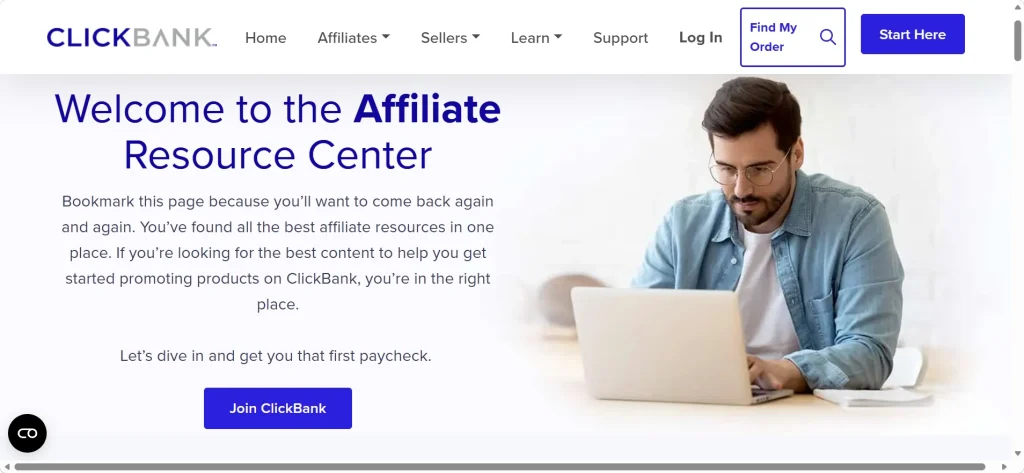
ClickBank provides free affiliate marketing resources and help documentation, alongside an optional paid educational platform called Spark.
According to ClickBank’s own 2026 overview of Spark, its advertised standard options include:
- Spark Monthly: $47 per month.
- Spark Ultimate: $297 as a one-time payment under the advertised package terms.
The training covers subjects such as affiliate marketing fundamentals, organic traffic, paid advertising, copywriting and email marketing.
Its Spark FAQ confirms that a Spark subscription doesn’t change the functionality of your regular ClickBank account.
You can use ClickBank without purchasing Spark.
I haven’t personally taken Spark’s courses, so I can’t assess their teaching quality or determine whether they are worth the price. I would explore the available free resources before deciding whether paid training would fill a specific gap in my knowledge.
How does ClickBank pay affiliates?
This is one of the most important sections of the review because there are several differences between generating a sale, earning a commission and actually receiving payment.
ClickBank commission rates
ClickBank supports two principal commission arrangements: revenue share and CPA.
Commission type | How it works |
|---|---|
Revenue share (RevShare) | You receive an agreed percentage of eligible transaction revenue. Additional commissions may apply to qualifying upsells or subscription payments, depending on the offer. |
Cost per action (CPA) | You receive an agreed fixed commission for a qualifying sale, generally without additional commissions on subsequent upsells or subscription payments. |
Commission rates vary between products and sellers. There is no universal rate that applies to everything in the marketplace.
ClickBank’s commission structure documentation provides further details about these arrangements.
A simple commission example
Suppose a product costs $100 and the seller offers a 50% revenue-share commission.
Under the standard pricing calculation in the Accounting Policy, ClickBank retains $8.50 from a $100 transaction, leaving $91.50 before other applicable adjustments.
A 50% affiliate commission calculated on that amount would be $45.75, rather than $50.
This is an illustration of the standard revenue-share calculation; other transaction types and agreements can differ.
The practical lesson is to understand the amount your commission is calculated on rather than relying entirely on the advertised percentage.
The Customer Distribution Requirement
ClickBank requires users to meet its Customer Distribution Requirement, commonly called the CDR, before receiving their first eligible payout.
Under the current accounting policy, the account must generate at least five qualifying sales.
The criteria include:
- Purchases from at least five distinct customers.
- Each qualifying purchase must be more than 14 days old.
- The purchases must involve multiple payment methods.
- The sales must satisfy ClickBank’s applicable legitimacy and anti-abuse criteria.
The requirement is designed to prevent abuse, including accounts used primarily to collect fraudulent rebates on personal purchases.
ClickBank states that the CDR generally only needs to be satisfied once per nickname account.
This means that generating your first sale, or even reaching your payment threshold through a small number of sales, doesn’t necessarily mean you qualify to receive the money.
You can read more in ClickBank’s Customer Distribution Requirement guide.
ClickBank’s minimum payout amount
A payment threshold is the minimum eligible account balance required before a payment can be generated.
According to ClickBank’s current Accounting Policy:
Payment threshold | Amount |
|---|---|
Default threshold | $100 |
Minimum selectable threshold | $50 |
Maximum selectable threshold | $1,000,000 |
An older ClickBank help article about payment amounts (April 7, 2025) still lists a $10 minimum. The formal Accounting Policy dated September 10, 2026 specifies $50. I would use the newer formal policy for planning and confirm the options shown in your account.
Lowering your threshold may help you receive eligible earnings sooner, although receiving more frequent payments can also increase your total processing fees.
Payment methods and payout schedule
ClickBank documents several payment options:
Payment method | Important considerations |
|---|---|
Direct deposit | Available in the United States and supported international locations. |
Paper check | Availability and delivery times vary. |
Wire transfer | Additional fees apply. |
Payoneer | An alternative for eligible users. |
ClickBank does not directly issue affiliate payouts through PayPal.
Under the Accounting Policy, eligible direct-deposit and wire-transfer accounts can receive weekly or biweekly payments; paper checks are issued biweekly. The standard payment schedule sends payments on Fridays, with additional time for bank processing.
ClickBank also documents twice-weekly payments for qualifying clients in its seller help section. The feature requires separate enablement through an account manager; eligibility for a newly registered affiliate is not established. Don’t plan your cash flow around it.
Check which payment methods and frequencies are available to your account and country through ClickBank’s payment method documentation.
Return reserves and withheld earnings
ClickBank may temporarily retain part of your earnings to account for potential refunds, chargebacks and related issues.
The Accounting Policy describes a standard 10% return allowance, normally released after 12 weeks. ClickBank can adjust the percentage to reflect account history and potential returns.
A reserve isn’t necessarily a permanent expense, but it can delay access to part of your earnings.
This matters if you’re paying for advertising or other services before receiving the money from your sales.
Refunds and reversed commissions
What happens when a customer requests a refund?
For revenue-share commissions, an approved refund can result in the corresponding commission being reversed.
Under ClickBank’s standard CPA arrangement, however, the affiliate generally retains the fixed commission when the customer later receives a refund or files a chargeback. The seller bears the corresponding financial responsibility under that arrangement.
ClickBank explains this distinction in its refunded commission documentation.
Refunds and chargebacks can also create negative balances in certain circumstances, so receiving a payment does not necessarily eliminate the possibility of future financial adjustments.
What is ClickBank’s refund policy?
ClickBank’s Return and Subscription Cancellation Policy describes a discretionary 60-day return framework.
However, its current Client Contract allows sellers to establish product-specific policies ranging from no refunds to 60 days, with longer periods requiring ClickBank’s approval.
That means you shouldn’t tell your audience that every ClickBank product automatically includes an unconditional 60-day money-back guarantee.
Check the actual product’s terms before making any recommendation.
For recurring subscriptions, customers can request cancellation to stop future charges. Cancellation alone does not automatically refund money already paid.
As an affiliate, understanding the refund policy helps you explain the product accurately and anticipate potential commission adjustments.
Don’t confuse commissions with available cash
Before treating affiliate earnings as spendable income, understand the difference between:
- Recorded commissions: Earnings attributed to your affiliate activity.
- Adjusted commissions: Earnings remaining after refunds and other applicable reversals.
- Payable balance: Funds that are eligible for payment after relevant requirements and reserves.
- Actual payout: Money issued to you after applicable processing fees.
You should also maintain accurate records for tax purposes.
Affiliate income may be taxable even if you don’t receive a particular tax reporting form. Requirements vary by location, so consult a qualified tax professional when necessary.
Inside the ClickBank Marketplace
The ClickBank Marketplace is where affiliates discover products and sellers they may want to promote.
ClickBank’s public documentation describes search functionality, product categories, filters, seller resources and performance statistics. I have not tested these features in an authenticated account.
These tools can help you narrow down potential offers, but their usefulness depends on understanding what the information actually means.
Understanding ClickBank Gravity, EPC and conversion rates
According to ClickBank’s Marketplace statistics guide, several metrics can help affiliates compare offers.
Metric | What it tells you | What it doesn’t tell you |
|---|---|---|
Gravity | Weighted affiliate commission activity during the previous 90 days. | Whether the product is trustworthy or appropriate for your audience. |
Average dollars per conversion | Average commission associated with a conversion over the previous 90 days, including applicable upsells and recurring payments. | How much you personally will earn per customer. |
Conversion rate (CVR) | How frequently affiliate-link clicks produced initial purchases during the previous 30 days. | Whether your own visitors will convert at the same rate. |
Earnings per click (EPC) | Average net commission earned per affiliate click during the previous 30 days. | Whether promoting the product will be profitable after your expenses. |
These figures describe historical activity. New products or offers without recent sales may not have complete statistics.
Gravity deserves particular attention because beginners can easily mistake it for a product quality rating.
A higher Gravity score suggests that more affiliates have recently generated commissions from an offer, with greater weight given to more recent activity.
That can be useful information, but it doesn’t establish customer satisfaction or prove that the product will convert well for your audience. Popular products may also attract greater competition.
A lower Gravity score doesn’t automatically indicate a bad product. It could reflect a newer offer, less affiliate activity or a smaller audience.
I would use marketplace statistics as one part of the evaluation process, not as a substitute for examining the product itself.
How to choose ClickBank products worth promoting
If I were beginning with ClickBank, product selection would be one of my highest priorities.
A product with an impressive commission percentage can still be a poor choice if it disappoints customers or doesn’t match their needs.
Before promoting an offer, I would work through the following questions.
Does the product solve a real problem for my audience?
Start with the people you want to help, not the commission you want to earn.
Ask what they’re struggling with, what alternatives they’ve considered and what would genuinely improve their situation.
If you haven’t identified the audience you want to serve, my guide to choosing a profitable niche can help you evaluate potential directions before selecting affiliate products.
Can I establish what the customer actually receives?
Read the entire product description and sales page.
Look for clear explanations of:
- What’s included in the purchase.
- Who the product is designed for.
- What knowledge or resources the customer needs.
- Whether additional purchases are necessary.
- What limitations the product has.
If you can’t explain what someone receives after buying, you probably don’t know enough to recommend it.
Are the marketing claims credible?
Be especially cautious with offers involving health, financial results or income opportunities.
Look for verifiable evidence rather than dramatic testimonials, unexplained earnings screenshots or promises that everyone can achieve the same outcome.
Question artificial scarcity, such as countdown timers that repeatedly reset or claims about limited availability that don’t have a credible explanation.
Avoid repeating a seller’s promotional claims simply because they might persuade someone to buy.
Are pricing, upsells and subscriptions clear?
Some offers include additional products, upgrades or recurring payments.
Upselling isn’t inherently unethical. A supplementary product can provide useful value when its cost and purpose are clearly communicated.
The problem arises when the initial offer doesn’t provide what the buyer reasonably expected without additional spending, or when ongoing charges aren’t communicated clearly.
Before recommending a product, establish its full potential cost and explain any material limitations to your audience.
Can I investigate the seller and product independently?
Look beyond the seller’s own testimonials.
Search for independent feedback, the company’s reputation, customer support information and evidence that the product delivers what it promises.
Remember that product reviews can themselves contain affiliate links. Examine whether the reviewer provides credible evidence and acknowledges meaningful disadvantages.
The same standard applies to my recommendations about Wealthy Affiliate.
Do I understand the commission and promotion rules?
Check the offer’s commission model, approval requirements, refund terms and restrictions on promotional methods.
A product that pays a high commission may still be unsuitable if its promotion rules conflict with the way you intend to reach customers.
Would I recommend it without receiving a commission?
Would you recommend the product to someone who trusts your advice if you earned nothing from the sale? If not, choose another offer.
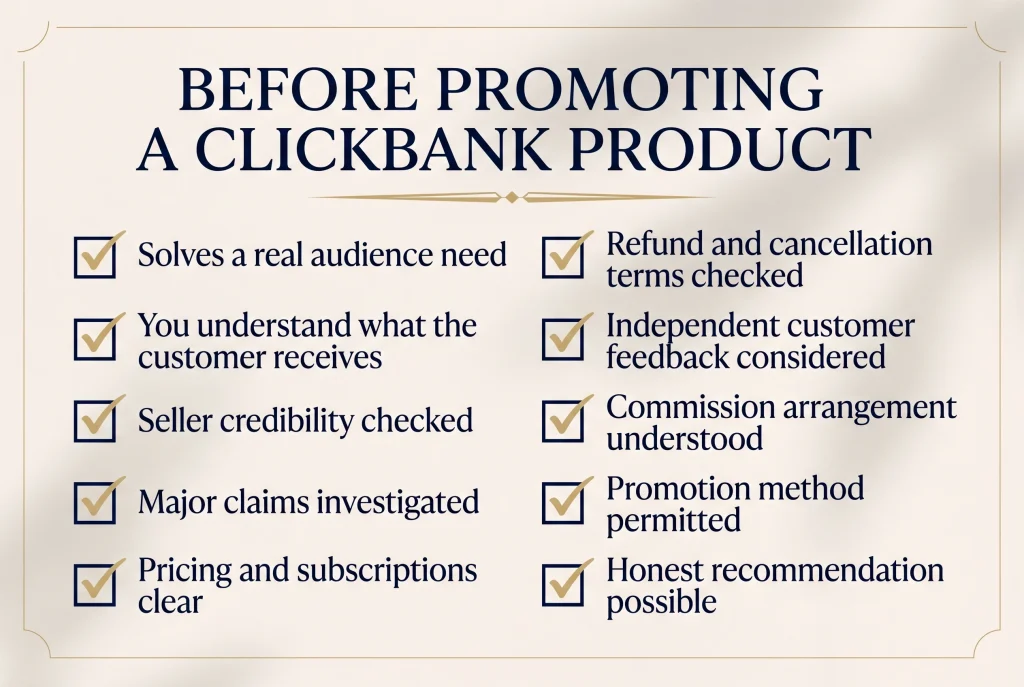
My pre-promotion checklist
Before promoting an offer, confirm that… | Check |
|---|---|
The product addresses a genuine audience need. | ☐ |
You understand what the customer receives. | ☐ |
You have investigated the seller’s credibility. | ☐ |
Its significant claims can be supported. | ☐ |
Pricing, subscriptions and upsells are clear. | ☐ |
You understand refund and cancellation terms. | ☐ |
You have considered independent customer feedback. | ☐ |
The commission arrangement is understood. | ☐ |
Your promotional method is permitted. | ☐ |
You can make an honest recommendation with adequate supporting evidence. | ☐ |
If important questions remain unanswered, don’t feel obligated to promote the offer.
Protecting your audience’s trust is more valuable than earning a commission from a product you’re unsure about.
What ClickBank reviews and complaints reveal
To evaluate ClickBank fairly, it’s important to consider experiences outside its own marketing materials.
Public reviews are available through sources such as ConsumerAffairs, Trustpilot, G2 and Capterra.
Some reviewers describe positive experiences with offer availability, payment infrastructure, reporting and customer assistance. Others report concerns involving account setup, access to earnings, product quality, billing and difficulties obtaining refunds.
These reviews aren’t a representative survey of everyone using ClickBank, and I wouldn’t treat them as evidence of how frequently a particular problem occurs.
Instead, I would separate the feedback into two categories.
Complaints about the platform
These relate to ClickBank’s own operations, such as account verification, payment requirements, account restrictions, reporting or customer service.
Look for specific details about the circumstances, whether the reviewer satisfied the relevant policies and whether similar problems are reported independently.
Complaints about individual products
These may concern misleading advertising, disappointing product quality, unexpected subscriptions, aggressive upsells or refund difficulties.
Such complaints may involve the seller, ClickBank’s transaction and customer service processes, or a combination of both.
They shouldn’t automatically determine your opinion of the entire marketplace, but they are relevant when deciding whether to recommend a particular product.
I would give more weight to detailed, verifiable experiences than to a star rating or an extremely positive or negative statement without supporting information.
If you need help with a purchase, use the official ClickBank customer support portal to locate the order or request assistance. You can also consult the return and cancellation policy to understand your options.
Can you realistically make money with ClickBank?
Yes, earning commissions through ClickBank is possible.
However, I haven’t found a reliable, representative earnings figure that tells a complete beginner how much they should expect to make.
Individual success stories, commission screenshots and impressive marketplace statistics don’t establish typical results.
Some affiliates may generate meaningful income. Others may earn very little or nothing, and some may lose money through advertising and other expenses.
Your results will depend on several factors.
Factor | Why it matters |
|---|---|
Audience relevance | People need to have a genuine reason to consider your offer. |
Traffic | You need a way to attract potential customers. |
Trust | Readers need credible information to make a purchase decision. |
Product quality | Unsuitable products can lead to dissatisfied customers and refund requests. |
Conversion performance | Visitors don’t automatically become customers. |
Expenses | Advertising, software and other costs reduce profitability. |
Consistency | Developing useful content and an audience requires continued effort. |
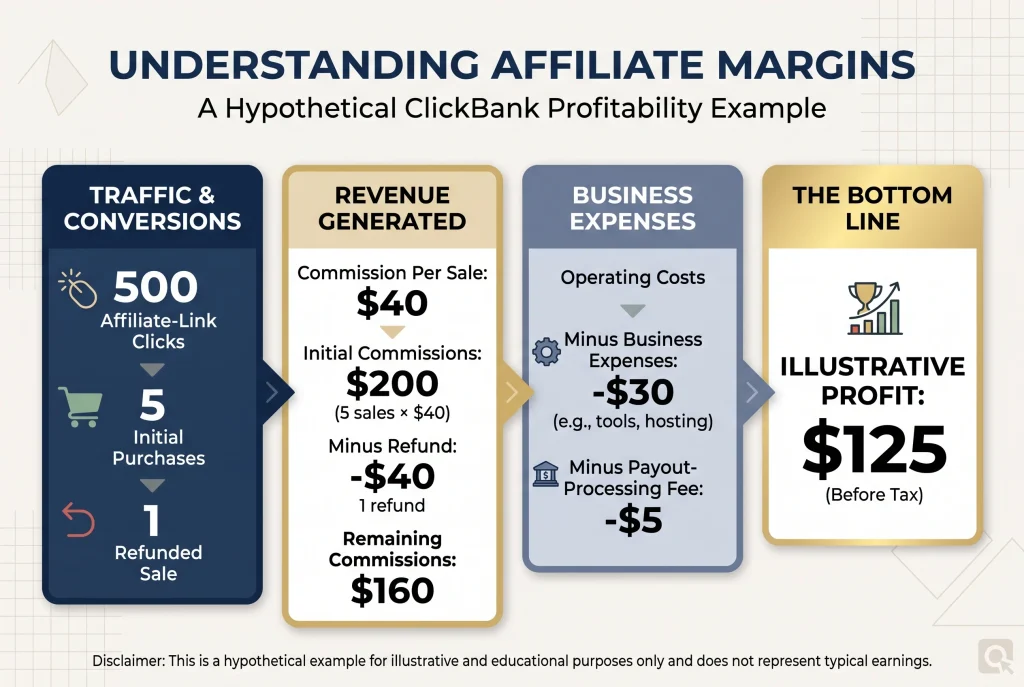
A realistic way to understand the numbers
Imagine you’re promoting a product that pays $40 for each qualifying revenue-share sale.
Suppose your marketing generates 500 affiliate-link clicks, and five of those visitors make a purchase.
For illustration, assume one purchase is refunded and you spend $30 on business tools or other marketing expenses during the period.
Example activity | Amount |
|---|---|
Affiliate-link clicks | 500 |
Initial purchases | 5 |
Initial conversion rate | 1% |
Commission per sale | $40 |
Initial commissions | $200 |
One refunded commission | −$40 |
Remaining commissions | $160 |
Business expenses | −$30 |
One standard payout-processing fee | −$5 |
Illustrative profit before tax | $125 |
These numbers are entirely hypothetical. They aren’t my results, typical ClickBank earnings or a prediction of what you could achieve.
This example assumes the affiliate has already satisfied the Customer Distribution Requirement separately, has met the applicable payment threshold, and receives one eligible payout. The five purchases shown here, including the refunded sale, do not by themselves establish eligibility. A return reserve could temporarily delay some cash, and other adjustments could change the amount.
If advertising cost $250 instead of the $30 shown above, the same activity would produce a $95 loss before tax, assuming the same payout fee and no other expenses.
How long could it take to make money?
There is no dependable timeline that applies to every beginner.
Someone with an existing audience may have a different starting point from someone creating their first website or social media channel.
Your initial objective shouldn’t necessarily be earning a specific amount within a specific period. I would focus first on understanding an audience, publishing useful content, attracting relevant visitors and collecting enough information to evaluate whether the business is progressing.
My content marketing strategy for a new website provides a manageable approach to building a publishing routine without trying to do everything at once.
If you need dependable income to cover immediate living expenses, I wouldn’t rely on a new ClickBank affiliate business to provide it.
ClickBank pros and cons
ClickBank pros
- Free registration and no standard monthly subscription.
- Digital and physical offers across multiple categories.
- No need to create or fulfill your own product.
- Established transaction processing and affiliate tracking.
- Revenue-share and CPA options, including potential recurring commissions.
- Historical marketplace metrics for evaluating offers.
- Free educational resources and optional paid training.
ClickBank cons
- Product claims and seller quality need independent vetting.
- First-payment eligibility and thresholds can delay access to commissions.
- Dormant account charges can reduce unpaid balances.
- Revenue-share commissions can be reversed after refunds or chargebacks.
- Return reserves and payment fees affect cash flow.
- Popular offers may attract strong competition.
- You need your own audience and marketing strategy.
- Some sellers require approval or restrict promotion methods.
Is ClickBank good for beginners?
ClickBank can be suitable for beginners, but I would distinguish between being easy to join and being easy to succeed with.
Opening an account is free, and the platform provides resources explaining its features.
However, building a profitable affiliate business requires more than understanding the marketplace.
You need to develop skills in areas such as audience research, product evaluation, content creation, traffic generation and basic business finances.
ClickBank may suit you if…
- You’re interested in affiliate marketing and willing to learn how it works.
- You’ve identified a particular audience or niche.
- You have, or are willing to develop, a way to attract relevant visitors.
- You’re comfortable evaluating products critically.
- You understand that your first commission may not result in an immediate payout.
- You’re prepared to build gradually without expecting guaranteed income.
You may benefit from waiting if…
- You’re relying on affiliate marketing to pay urgent bills.
- You haven’t decided whom you want to help or what problem you want to address.
- You’re planning to spend money on advertising without understanding conversion rates and profitability.
- You’re primarily attracted to unusually high commission percentages.
- You expect a platform to automatically generate traffic and sales for you.
ClickBank vs. Wealthy Affiliate: Understanding the difference
Since I use Wealthy Affiliate to build my own online business, it’s worth explaining how the two platforms differ.
They aren’t direct substitutes in every respect.
ClickBank is primarily an affiliate marketplace and commerce platform, while Wealthy Affiliate primarily focuses on online business education and website development.
Feature | ClickBank | Wealthy Affiliate |
|---|---|---|
Primary purpose | Connecting sellers and affiliates and facilitating transactions. | Helping people learn to build and develop online businesses. |
Product discovery | Dedicated affiliate marketplace. | Affiliate research and business resources, depending on available features. |
Affiliate payments | Processes applicable commissions for offers promoted through ClickBank. | Operates its own referral program; earnings from other programs are governed by those programs. |
Education | Free resources and optional Spark training. | Structured online business and affiliate marketing training. |
Website-building resources | Separate optional tools and supported integrations. | Website-building and hosting resources according to membership level. |
Community | Educational and support resources, including community features through Spark. | Member community and business support resources. |
Entry cost | Free account registration. | Free Starter membership available. |
Best suited for | Finding and promoting affiliate offers. | Developing the knowledge and resources needed to build an online business. |
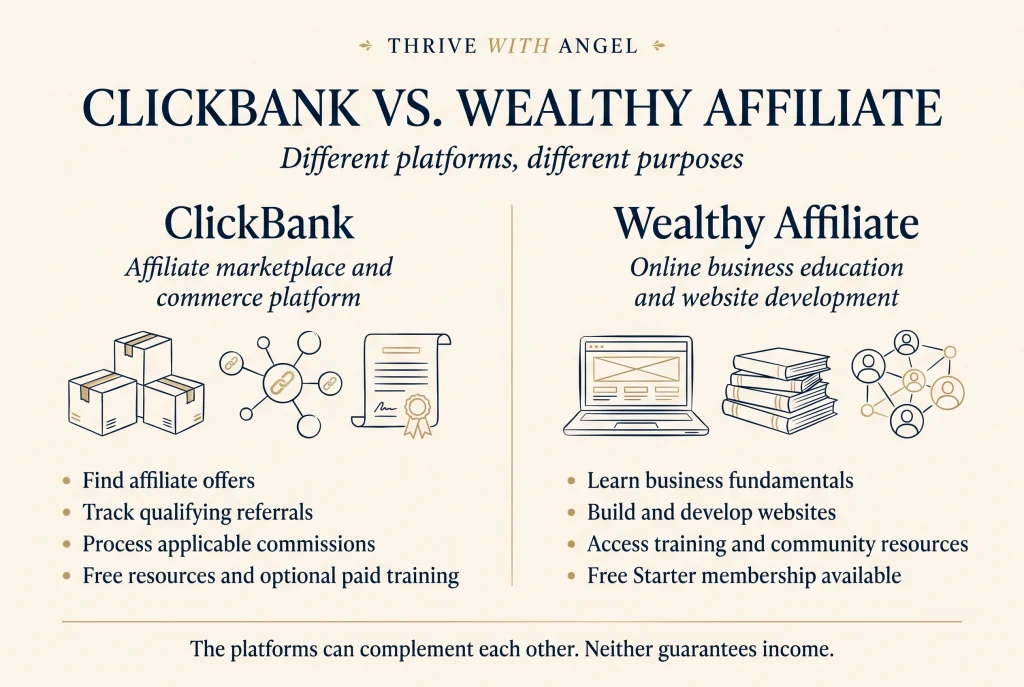
The two platforms can potentially complement each other.
For example, someone could use Wealthy Affiliate to develop a website and learn how to attract an audience, then use ClickBank to find relevant products to promote.
Someone else could develop those same skills independently or through ClickBank’s educational resources without ever joining Wealthy Affiliate.
My preference for Wealthy Affiliate comes from my experience using it to develop my own websites and learn online business fundamentals. I cannot offer an equivalent firsthand assessment of ClickBank because I haven’t used it as an affiliate.
If you’re interested in understanding my experience, I’ve written a separate Wealthy Affiliate review that covers its strengths, disadvantages and who I think it suits.
I’ve also published a detailed Wealthy Affiliate pricing comparison explaining its membership options and associated costs.
You don’t need Wealthy Affiliate to succeed with ClickBank. Your choice should depend on which skills and resources you need, rather than feeling obligated to choose one platform over the other.
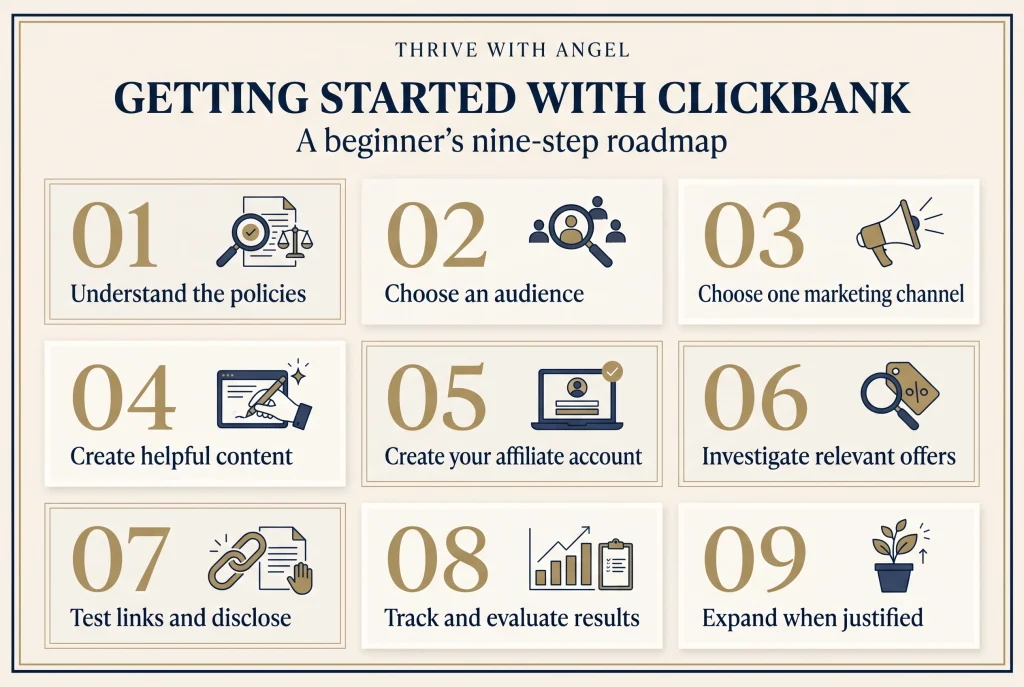
How I would get started with ClickBank as a beginner
If I decided to explore ClickBank seriously, this is the approach I would take.
This is a proposed strategy based on my research and understanding of online business development, not a description of a ClickBank campaign I’ve already completed.
Step 1: Understand the policies before registering
Read the current rules covering fees, refunds, dormant accounts, commission structures and payment eligibility.
Confirm that you can register from your location and receive payments through an available method.
Make sure you understand the requirements that could affect when you actually receive your earnings.
Step 2: Choose an audience before choosing a product
Identify a group of people you would genuinely like to help.
Learn what problems they’re experiencing, what questions they’re asking and what products or services they might find useful.
My eight-step guide to starting an online business provides a broader framework for developing this foundation.
Step 3: Choose one primary marketing channel
You don’t need to start a website, YouTube channel, newsletter and several social media accounts simultaneously.
Choose one channel that fits your skills, resources and audience.
Personally, I favor building helpful content on a website because it gives me more control over how my information is organized and presented.
However, other approaches can work, provided they comply with the relevant platform and seller policies.
Step 4: Start creating helpful content
Before heavily promoting products, publish information that answers genuine questions from your intended audience.
Examples could include:
- Beginner tutorials.
- Product comparisons.
- Solutions to common problems.
- Practical checklists.
- Explanations of important concepts.
This gives people a reason to discover and return to your content beyond being asked to purchase something.
Step 5: Create your affiliate account when you’re ready
Once you understand the platform’s policies and have a basic marketing direction, register and complete the required account setup.
Step 6: Shortlist and investigate a few offers
Rather than attempting to promote dozens of products, identify two or three promising offers that closely match your audience.
Apply the product evaluation checklist from earlier in this review.
Investigate their claims, pricing, seller resources, customer experiences, commissions and promotional restrictions.
If you cannot obtain enough reliable information to recommend an offer responsibly, leave it out.
Step 7: Test your tracking links and disclose your relationship
Before publishing an affiliate link, follow ClickBank’s HopLink testing instructions to check that it is correctly configured.
You don’t need to make a personal purchase through your link to verify basic tracking. Never attempt to manipulate sales to satisfy payout requirements.
Disclose your financial relationship clearly when recommending products.
The Federal Trade Commission’s endorsement guidance provides useful information about making affiliate disclosures understandable and appropriately placed for US audiences.
Step 8: Track results and evaluate them
Keep records of your marketing activity and expenses.
Track affiliate-link clicks, initial sales, refunds, commission adjustments and actual payments separately.
If people click but don’t purchase, examine whether the offer, audience or content is appropriate.
If you’re earning commissions but losing money overall, investigate your expenses.
Don’t interpret every disappointing result as a reason to buy another tool or course.
Step 9: Expand only when you have a reason to
Once you’ve developed a better understanding of what your audience needs and how your marketing performs, consider testing additional products or channels.
Paid advertising can be a potential growth strategy, but I wouldn’t make it my starting point without a defined budget and an understanding of the risks.
Frequently asked questions
Is ClickBank free to join?
Yes. Account registration is free, but payout fees, balance-based dormant fees and optional business expenses may apply.
Do you need a website to use ClickBank?
No, owning a website isn’t a universal requirement for ClickBank affiliates.
ClickBank’s affiliate marketing FAQ describes alternatives such as social media, video marketing and email marketing.
Individual offers and promotional platforms may have additional rules.
A website can nevertheless be useful because it gives you greater control over your content and how you communicate with your audience.
Can you use ClickBank without paid advertising?
Yes. You can potentially promote suitable products through organic search traffic, educational videos, social media content and other permitted unpaid marketing channels.
Organic marketing may require considerable time and effort, and it doesn’t guarantee sales.
Does ClickBank pay through PayPal?
No. PayPal may be used by customers for some purchases, but it is not a direct affiliate payout method. Eligible alternatives include direct deposit, check, wire and Payoneer.
Why hasn’t ClickBank paid my commissions?
Possible reasons include not meeting the Customer Distribution Requirement, having an insufficient eligible balance, incomplete verification, withheld reserves, adjustments or payment-processing issues.
Check your payment information and ClickBank’s missing payment guidance to identify the reason.
I haven’t personally received payments from ClickBank, so I can’t assess its payout reliability from firsthand experience.
Can you lose ClickBank commissions after earning them?
Yes. Revenue-share commissions can be reversed following refunds or chargebacks.
Standard CPA commissions are treated differently under ClickBank’s policies, so check which arrangement applies to your offer.
Is Spark necessary to become a ClickBank affiliate?
No. Spark is optional paid education, not a requirement for a regular ClickBank account.
Can you use ClickBank and Wealthy Affiliate together?
Yes. The platforms serve different primary purposes and can potentially complement each other.
You could develop an affiliate website through Wealthy Affiliate and use ClickBank as one source of relevant products.
Neither platform guarantees that the resulting business will generate income.
Is ClickBank better than other affiliate marketplaces?
That depends on your audience, niche, product preferences and business strategy.
Compare product quality, commission arrangements, payment terms, refund policies and promotional restrictions before choosing a marketplace.
The best platform for your business is the one that helps you serve your audience responsibly and operate sustainably, not necessarily the one advertising the highest commissions.
Final verdict: Is ClickBank worth trying in 2026?
ClickBank is worth exploring if you have, or are willing to build, a way to reach an audience and can carefully evaluate products before recommending them. Its low entry cost makes it accessible, but payout rules and marketing costs matter just as much as potential commissions.
If you already have an audience and want to investigate relevant offers, visit ClickBank’s official website. If you’re still learning the basics, start with its free affiliate resource center before spending money on training or advertising.
If you need help choosing a niche, developing a website or attracting an audience, my Start Here roadmap can help you identify a suitable direction.
You can also explore Wealthy Affiliate’s free Starter membership if you’d prefer a structured introduction to building an online business. I may earn a referral commission if you join through this link, at no additional cost to you.
Whichever approach you choose, don’t feel pressured to buy training, subscribe to several tools or start promoting products before you’re ready.
The most valuable thing you can build as an affiliate is an audience that trusts your recommendations.
Choose your products carefully, be transparent about your financial relationships, and give people information that helps them make better decisions.
That is the kind of online business I believe is worth building.